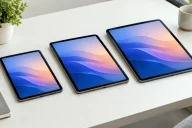
Tablet Size Comparison Chart for Buyers: How to Choose the Right Tablet Screen Size
Choosing the right tablet involves more than comparing processors, storage capacity, battery life, and camera specifications. One of the most important factors to consider before purchasing a tablet is its screen size. Tablets are available in several sizes, ranging from compact models designed for portability to large-screen devices built for productivity, entertainment, and creative work. Understanding the differences between these sizes can help buyers select a device that matches their daily requirements.
Table of Contents
- Why Tablet Screen Size Matters
- Tablet Size Comparison Chart
- Compact Tablets: 7 to 8 Inches
- Small to Medium Tablets: 8 to 10 Inches
- Standard Tablets: 10 to 11 Inches
- Large Tablets: 11 to 13 Inches
- Extra-Large Tablets: 13 Inches and Above
- Understanding Screen Size and Aspect Ratio
- Tablet Screen Size and Physical Dimensions
- How to Choose the Right Tablet Size
- Other Factors to Consider Before Buying
- Final Thoughts
A tablet that feels comfortable for reading and browsing may not provide enough screen space for multitasking or professional work. Similarly, a large tablet might offer an excellent viewing experience but could feel inconvenient to carry around every day. This is why understanding tablet dimensions and display sizes is essential before making a purchase.
Why Tablet Screen Size Matters
Screen size directly influences how a tablet feels and performs during everyday use. A larger display provides more room for viewing documents, watching videos, editing photos, and running multiple applications. Smaller tablets, on the other hand, are easier to hold with one hand, carry in a bag, and use while travelling.
The display size also affects the overall dimensions and weight of the device. Two tablets with similar screen sizes may have different physical dimensions because of their bezels, aspect ratios, and body designs.
For students, a medium-sized tablet may provide enough space for digital notes, online classes, and reading textbooks. Professionals might prefer larger displays for reviewing spreadsheets, managing presentations, and working with external keyboards. Entertainment-focused users may prioritize a screen that offers an immersive experience without making the device difficult to carry.
Understanding these differences helps buyers avoid choosing a tablet that is either too small for their needs or unnecessarily large.
Tablet Size Comparison Chart
The following chart provides a general overview of popular tablet screen-size categories and their recommended uses.
| Tablet Size | Display Category | Best For | Portability |
|---|---|---|---|
| 7–8 inches | Compact | Reading, browsing, travel | Excellent |
| 8–9 inches | Small | E-books, casual gaming, entertainment | Excellent |
| 9–10 inches | Medium | Students, browsing, video streaming | Very Good |
| 10–11 inches | Standard | Everyday use, productivity, learning | Very Good |
| 11–12 inches | Large | Multitasking, digital notes, work | Good |
| 12–13 inches | Extra Large | Professional tasks, creative work | Moderate |
| 13–14 inches | Professional Large | Drawing, editing, productivity | Moderate |
| 14 inches and above | Oversized | Specialized professional workflows | Limited |
These categories are approximate. Actual display dimensions, body measurements, and usability vary depending on the manufacturer and model.
Compact Tablets: 7 to 8 Inches
Compact tablets are designed for people who prioritize portability. Their smaller dimensions make them convenient for reading e-books, checking emails, browsing websites, and watching short videos.
These devices are particularly useful for travellers and users who want something larger than a smartphone without carrying a full-sized tablet. Their lightweight construction makes them comfortable to hold for extended reading sessions.

A compact 8-inch tablet held in one hand demonstrating its portability and suitability for reading and travel.
However, compact displays have limitations. Reading complex documents, editing spreadsheets, and working with multiple applications can feel restrictive. Virtual keyboards also occupy a significant portion of the available screen space.
Compact tablets are best suited for casual users who primarily consume digital content rather than perform demanding productivity tasks.
Small to Medium Tablets: 8 to 10 Inches
Tablets in the 8-to-10-inch category offer a balance between portability and screen space. They provide a more comfortable viewing experience than compact devices while remaining relatively easy to carry.
This category works well for students who need a device for reading study materials, attending online classes, taking basic notes, and accessing educational applications. It is also suitable for browsing social media, watching movies, and playing casual games.

A medium-sized tablet displaying digital study material on a student’s desk with notebooks and stationery.
An 8-to-9-inch tablet is generally easier to hold with one hand, while a 9-to-10-inch model provides additional room for documents and videos.
Buyers should pay attention to display resolution and pixel density in this category. A smaller screen with a sharp display can provide a more comfortable reading experience than a larger screen with lower resolution.
Standard Tablets: 10 to 11 Inches
The 10-to-11-inch category is one of the most versatile options for everyday tablet users. These devices provide enough screen space for entertainment, education, communication, and light productivity without becoming excessively bulky.

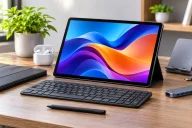
An 11-inch tablet with a wireless keyboard and stylus arranged on a desk for everyday productivity.
They are suitable for watching streaming content, browsing websites, reading PDFs, attending video meetings, and managing everyday tasks.
Students can use standard-sized tablets for digital textbooks, handwritten notes, and online learning. Professionals can connect compatible keyboards and use productivity applications for emails, presentations, and document editing.
Popular devices such as the Apple iPad 11-inch and Samsung Galaxy Tab S9 FE demonstrate why this size category appeals to a wide range of buyers.
For people purchasing their first tablet, an approximately 10-to-11-inch display is often a practical starting point.
Large Tablets: 11 to 13 Inches
Large tablets offer additional workspace for users who want more than basic entertainment and browsing capabilities. Their bigger displays make multitasking, document editing, digital drawing, and professional applications more comfortable.

A large-screen tablet displaying digital notes and a document side by side for multitasking and productivity.
A 12-inch tablet provides noticeably more screen area than an 10-inch model, particularly when working with spreadsheets, presentations, or creative software.
Large tablets are also useful for users who frequently split the display between two applications. For example, students can keep a textbook open on one side while writing notes on the other.
Professionals may find this category useful for reviewing documents, participating in virtual meetings, and managing work-related applications.
However, larger tablets can be heavier and less convenient to use while standing or travelling. Buyers should also consider the additional cost of compatible keyboards, styluses, and protective accessories.
Extra-Large Tablets: 13 Inches and Above
Extra-large tablets are designed for users who prioritize workspace and visual comfort. Their displays can provide an experience closer to that of a compact laptop, especially when paired with a keyboard and stylus.
Creative professionals can benefit from the additional space when drawing illustrations, editing photographs, reviewing video timelines, and working with detailed designs.

A 13-inch professional tablet displaying digital artwork with a stylus on a creative workspace.
Large displays are also useful for reading technical documents, managing complex spreadsheets, and running professional applications.
Devices such as the Apple iPad Pro 13-inch demonstrate the capabilities of this category.
The main disadvantages are portability, weight, and price. These tablets may be less comfortable for extended handheld use and are generally better suited to desk-based or supported working environments.
Understanding Screen Size and Aspect Ratio
Screen size alone does not determine how much usable display space a tablet provides. Aspect ratio is another important specification buyers should understand.
Aspect ratio describes the relationship between the width and height of a display. Common tablet aspect ratios include 4:3, 3:2, and 16:10.

Two tablets with different screen aspect ratios demonstrating variations in display width and viewing proportions.
A 4:3 display provides a relatively square viewing area. It is useful for reading documents, browsing websites, and working with digital notes.
A 3:2 display offers a balance between vertical and horizontal space. It can be suitable for productivity applications, document editing, and general use.
A 16:10 display is wider and works particularly well for watching widescreen videos and playing games.
For example, two tablets with 11-inch displays can offer different viewing experiences because their aspect ratios are not necessarily identical. Buyers should consider both specifications rather than comparing screen sizes alone.
Tablet Screen Size and Physical Dimensions
Display size is measured diagonally from one corner of the screen to the opposite corner. It does not represent the actual width or height of the tablet.
The physical dimensions depend on the display aspect ratio, bezel thickness, and overall device design.
A tablet with an 11-inch display may have different external measurements from another 11-inch tablet. Similarly, a model with narrow bezels may be physically smaller than an older device with a similar screen size.
Weight is another important consideration. A larger display generally requires a bigger body, but materials, battery capacity, and internal components also influence the final weight.
Before purchasing, check the manufacturer’s official width, height, thickness, and weight specifications. This is especially important if you intend to carry the tablet in a small backpack or use it for extended handheld sessions.
How to Choose the Right Tablet Size
The best tablet size depends on how you intend to use the device.
For students: A 10-to-11-inch tablet offers a useful balance for reading textbooks, taking notes, attending online classes, and completing assignments. Students who regularly work with multiple documents may prefer a larger display.
For entertainment: An 8-to-11-inch tablet is suitable for casual video streaming, browsing, and gaming. Users who frequently watch movies may prefer a larger widescreen display.
For business professionals: An 11-to-13-inch tablet provides additional space for emails, presentations, spreadsheets, and multitasking. Keyboard compatibility should also be considered.
For artists and designers: A 12-to-13-inch or larger tablet can provide a comfortable drawing surface. Stylus responsiveness, pressure sensitivity, and application compatibility are equally important.
For travellers: Compact 7-to-9-inch tablets are convenient for reading, browsing, and entertainment while travelling. Their smaller size makes them easier to store and carry.
For everyday users: A 10-to-11-inch tablet is a versatile choice for communication, browsing, entertainment, and occasional productivity.
Other Factors to Consider Before Buying
Although display size is important, buyers should evaluate several other specifications before selecting a tablet.
Display resolution determines how sharp images and text appear. Higher resolution can improve reading comfort, especially on larger screens.
Panel technology also matters. LCD displays are common and generally provide good everyday viewing quality, while OLED displays can offer deeper blacks and stronger contrast.
Battery capacity influences how long the tablet can operate between charges. Larger displays may consume more power, although actual battery life depends on hardware efficiency and usage.
Performance is another consideration. Buyers should select a processor and memory configuration that can comfortably handle their applications.
Storage capacity, operating system, stylus support, keyboard compatibility, speakers, and connectivity options should also be evaluated.
Finally, consider the total purchase cost. A tablet that appears affordable initially may become more expensive after adding a keyboard, stylus, protective case, and other accessories.
Final Thoughts
Choosing the right tablet screen size is an important step toward finding a device that suits your lifestyle and budget. Compact tablets are excellent for portability and reading, standard 10-to-11-inch models provide versatility for everyday activities, and larger displays offer additional workspace for productivity and creative tasks.
There is no universally perfect tablet size. The right choice depends on how frequently you travel, what applications you use, how much screen space you need, and whether you prefer handheld convenience or a larger working area.
Before making a purchase, compare display dimensions, aspect ratios, resolution, physical weight, and accessory compatibility. A carefully selected tablet will provide a more comfortable viewing experience and remain useful for years.