iPad Pro for Business: A Comprehensive Guide
The modern business environment demands technology that supports productivity, flexibility, collaboration, and efficient communication. Professionals increasingly need devices that can handle demanding workloads while remaining portable enough for travel, meetings, and remote work. Apple’s iPad Pro has become an attractive option for businesses because it combines powerful hardware, a high-quality display, advanced multitasking capabilities, and a versatile accessory ecosystem in a slim, portable design.
Table of Contents
- Why Choose an iPad Pro for Business?
- Powerful Performance for Professional Workloads
- Display Quality for Business and Productivity
- Multitasking and Productivity Features
- Essential Accessories That Improve Business Productivity
- Business Applications and Software Compatibility
- Security and Data Protection for Businesses
- Is the iPad Pro Suitable for Remote Work?
- iPad Pro vs Traditional Business Laptop
- Battery Life and Portability
- Things to Consider Before Buying an iPad Pro for Business
- Conclusion
Whether you are a business owner, entrepreneur, corporate professional, consultant, or creative specialist, the iPad Pro can support a wide range of professional activities. From managing documents and attending virtual meetings to editing content and presenting business proposals, it offers several features that make everyday work more convenient.
However, choosing an iPad Pro for business involves more than looking at its specifications. Understanding its productivity features, software compatibility, accessories, security capabilities, and limitations is essential before making an investment.
Why Choose an iPad Pro for Business?
The iPad Pro is designed to deliver a premium tablet experience with performance capabilities that support demanding professional tasks. Its combination of portability, powerful processing, and touchscreen functionality makes it different from conventional laptops and desktop computers.

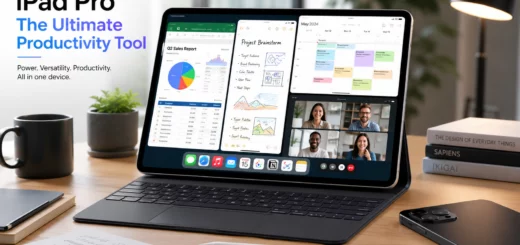
Business professional using an iPad Pro with a keyboard for everyday office tasks in a modern workspace.
One of its biggest advantages is flexibility. Employees can use it as a traditional tablet for reading, browsing, and taking notes or connect a keyboard and other accessories to create a more laptop-like workstation.
For business owners and professionals who frequently travel, this flexibility can be particularly useful. Carrying a lightweight tablet instead of a traditional laptop can make commuting and business travel more convenient.
The iPad Pro is also suitable for professionals who regularly switch between different activities. You can review presentations, respond to emails, participate in video conferences, annotate documents, and manage projects without constantly moving between multiple devices.
Powerful Performance for Professional Workloads
Performance is an important consideration when selecting a business device. The iPad Pro uses Apple’s advanced M-series processors, which provide substantial computing power for demanding applications.
Depending on the generation, the processor can handle activities such as multitasking, high-resolution photo editing, video production, graphic design, and complex document workflows.
For everyday business operations, this performance provides a responsive experience when working with spreadsheets, presentations, business applications, and multiple browser tabs.
Creative professionals can also benefit from the processing capabilities. Video editors can work with high-resolution footage, designers can create detailed illustrations, and marketing teams can produce visual content using professional applications.
The available memory and storage configurations vary by model. Businesses should consider their actual workloads before selecting a configuration. Professionals who regularly handle large media files or complex projects may benefit from higher storage capacity.
For standard office activities, a more affordable configuration may be sufficient.
Display Quality for Business and Productivity
The iPad Pro features a premium display designed to deliver excellent clarity, colour accuracy, and responsiveness.
Depending on the model, Apple offers advanced display technologies, including Ultra Retina XDR with tandem OLED technology in newer generations. These displays provide impressive contrast, deep blacks, and vibrant colours.

iPad Pro displaying a business spreadsheet and presentation with its high-resolution screen clearly visible.
For business professionals, display quality matters more than entertainment. Reading documents, reviewing presentations, examining product designs, and analysing visual content become more comfortable on a high-quality screen.
The larger display option is particularly useful for professionals who need additional workspace. It provides more room for multitasking, editing documents, viewing spreadsheets, and working with creative applications.
The display also supports Apple Pencil functionality, allowing users to write notes, annotate PDFs, sketch ideas, and mark up business documents naturally.
This makes the iPad Pro useful for professionals who prefer handwriting and visual interaction over traditional keyboard-based workflows.
Multitasking and Productivity Features
A business device should make it easier to manage multiple responsibilities throughout the working day. The iPad Pro supports multitasking through iPadOS features such as Stage Manager, Split View, and Slide Over, although availability and functionality vary across software versions.

iPad Pro displaying multiple productivity windows for managing documents, spreadsheets, and online business tasks.
Stage Manager allows users to organise supported applications and windows, making it easier to switch between tasks. For example, you can keep a spreadsheet open while referencing information from a browser or reviewing a presentation.
Split View is useful when working with two compatible applications simultaneously. You might open an email alongside a document or compare information from two different sources.
External display support adds another productivity advantage. With a compatible monitor, the iPad Pro can provide additional workspace for supported applications and workflows.
These features make it more practical for professionals who need to manage several business activities throughout the day.
However, iPadOS still operates differently from macOS and Windows. Some desktop-style workflows, application features, and window-management options may be limited. Businesses should evaluate their essential software before replacing existing computers.
Essential Accessories That Improve Business Productivity
Accessories can significantly expand the usefulness of the iPad Pro in a professional environment. Although the tablet works independently, adding the right peripherals can make it a more complete business workstation.

iPad Pro paired with a keyboard, Apple Pencil, external storage, and headphones for professional productivity.
Magic Keyboard
The Magic Keyboard provides a physical typing experience, a built-in trackpad, and a floating design. It makes writing reports, responding to emails, preparing presentations, and managing documents more convenient.
For professionals who spend considerable time typing, a keyboard is one of the most useful iPad Pro accessories.
Apple Pencil Pro
Apple Pencil Pro is particularly useful for designers, architects, educators, consultants, and professionals who frequently annotate documents or create handwritten notes.
It supports precise drawing and writing, making it suitable for brainstorming, sketching concepts, reviewing proposals, and marking up PDFs. Compatibility depends on the iPad Pro generation.
External Monitor
Connecting an external display can improve productivity by providing additional screen space. It is useful when working with presentations, documents, spreadsheets, and supported professional applications.
External Storage
USB-C connectivity allows compatible external storage devices to be connected to the iPad Pro. This is helpful for transferring files, managing media libraries, and working with large creative projects.
Headphones and Webcams
Wireless headphones can improve the experience of virtual meetings, while compatible external cameras and other peripherals can support specialised workflows.
Together, these accessories help transform the iPad Pro from a portable tablet into a more versatile professional setup.
Business Applications and Software Compatibility
Software compatibility is one of the most important factors when considering the iPad Pro for business.
The App Store provides access to numerous productivity and professional applications. Microsoft 365 applications, including Word, Excel, and PowerPoint, support common office tasks. Google Workspace applications help businesses manage documents, spreadsheets, presentations, and communication.

iPad Pro displaying a professional creative application alongside a camera, headphones, and external storage device.
Other useful applications include:
- Notion: Organising business information, notes, and project documentation.
- Slack: Managing team communication and workplace collaboration.
- Zoom: Participating in virtual meetings and business discussions.
- Trello: Organising projects, tasks, and team responsibilities.
- Adobe Acrobat: Reviewing, signing, and annotating PDF documents.
- Canva: Creating marketing graphics, presentations, and promotional content.
Creative professionals can also use applications such as Final Cut Pro for iPad and professional illustration tools.
However, not every desktop application has an equivalent iPad version. Certain accounting platforms, enterprise software, specialised development tools, and advanced spreadsheet workflows may offer reduced functionality or require browser-based access.
Before purchasing multiple devices for employees, businesses should test their most important applications on an iPad Pro.
Security and Data Protection for Businesses
Business devices frequently contain sensitive information, including financial documents, customer records, internal communications, and confidential files. Security should therefore be a major consideration.
The iPad Pro includes several security features designed to protect personal and business information.
Face ID provides biometric authentication, allowing users to unlock their devices and authenticate supported activities. Hardware-based security technologies help protect sensitive information, while iPadOS provides regular security updates.
Businesses can also use mobile device management solutions to configure devices, enforce security policies, manage applications, and control access to organisational resources.
For companies with multiple employees, centralised device management can simplify deployment and administration.
Additional precautions should include enabling strong passcodes, using secure Wi-Fi networks, activating multi-factor authentication for business accounts, and maintaining regular backups.
These measures help reduce security risks and support responsible business device management.
Is the iPad Pro Suitable for Remote Work?
Remote work has increased the importance of portable devices that support communication and collaboration. The iPad Pro offers several features that make it suitable for professionals working outside traditional office environments.

iPad Pro being used for a remote business video meeting with a keyboard and headphones in a home office.
Its front-facing camera, microphones, and speakers support video conferencing and online meetings. Applications such as Zoom and Microsoft Teams make it easier to communicate with colleagues, clients, and business partners.
Professionals can also access cloud-based documents, share files, review presentations, and collaborate on projects from different locations.
The lightweight design makes it convenient for travelling professionals who need access to important business information.
With a keyboard and reliable internet connection, the iPad Pro can handle many everyday remote-work responsibilities.
However, professionals who depend on specialised desktop software or complex multi-window workflows may still need a conventional laptop.
iPad Pro vs Traditional Business Laptop
The iPad Pro and traditional laptops serve overlapping but different purposes.
An iPad Pro offers better flexibility for touchscreen interaction, handwritten notes, portability, and creative activities involving the Apple Pencil. Its tablet design also makes presentations and document reviews more convenient.
Traditional laptops generally offer greater flexibility for desktop applications, advanced file management, specialised business software, and complex multitasking.
The right choice depends on how you work.
For business owners who primarily manage emails, documents, online meetings, presentations, and cloud-based applications, an iPad Pro may serve as a capable primary device.
For software developers, financial analysts, engineers, and professionals who rely on specialised desktop applications, a laptop may remain the better option.
Some businesses may find that using an iPad Pro alongside existing computers provides the most practical solution.
Battery Life and Portability
Portability is another major advantage of the iPad Pro. Its slim design makes it easy to carry between offices, meetings, classrooms, and business trips.
Battery performance depends on the model, screen brightness, applications, network connectivity, and workload. Apple advertises up to 10 hours of web browsing over Wi-Fi or video playback for several recent iPad Pro generations under specified conditions.
For most professionals, this can support a substantial portion of a working day, although demanding applications and continuous video conferencing may reduce battery life.
The USB-C charging connection also provides flexibility when travelling with compatible charging equipment.
Things to Consider Before Buying an iPad Pro for Business
Despite its advantages, the iPad Pro may not be the perfect choice for every professional.
First, consider the overall investment. The tablet itself is already a premium device, and accessories such as the Magic Keyboard, Apple Pencil Pro, and external storage can increase the total cost.
Second, examine software compatibility. Make sure your essential business applications offer the features you need on iPadOS.
Third, consider storage requirements. Businesses handling large documents, videos, and creative files should select sufficient internal storage.
Finally, evaluate whether employees genuinely need a high-end tablet. Some everyday office tasks can be completed using a more affordable iPad or conventional laptop.
Choosing a device based on actual business requirements rather than specifications alone can help organisations manage technology expenses more effectively.
Conclusion
The iPad Pro is a powerful and versatile device that can support a wide range of modern business activities. Its advanced processing capabilities, premium display, multitasking features, accessory compatibility, and portable design make it an attractive option for entrepreneurs, professionals, and creative teams.
It works particularly well for communication, document management, presentations, remote collaboration, digital note-taking, and creative workflows.
However, its suitability as a complete laptop replacement depends on software requirements and individual working habits. Professionals who rely on specialised desktop applications may still need a traditional computer.
Ultimately, the iPad Pro is best viewed as a flexible business productivity tool rather than a universal replacement for every computer. By choosing the right configuration, accessories, and applications, businesses can use it to improve mobility, streamline everyday tasks, and create a more flexible working environment.