iPad Pro: The Ultimate Productivity Tool
Nowadays, professionals, students, entrepreneurs, and creatives are constantly searching for devices that combine power, portability, and versatility. Among the many options available, the iPad Pro stands out as one of the most capable productivity devices on the market.
Table of Contents
- What Makes the iPad Pro Special?
- Exceptional Performance for Demanding Tasks
- Stunning Display for Enhanced Productivity
- Seamless Multitasking Capabilities
- Apple Pencil: A Game-Changer for Productivity
- Magic Keyboard Turns the iPad Pro into a Laptop Alternative
- Powerful App Ecosystem
- Excellent Portability for Mobile Professionals
- Seamless Integration with the Apple Ecosystem
- Ideal for Remote Work and Hybrid Work Environments
- Creative Professionals Benefit Greatly
- Security and Privacy Features
- Future-Proof Technology
- Conclusion
With its cutting-edge hardware, powerful software ecosystem, and seamless integration with other Apple devices, the iPad Pro has evolved far beyond being just a tablet. It has become a true productivity powerhouse capable of handling demanding workflows, creative projects, and everyday business tasks.
What Makes the iPad Pro Special?
The iPad Pro is Apple’s premium tablet designed for users who need professional-level performance in a portable form factor. Equipped with Apple’s advanced silicon chips, high-resolution displays, and support for accessories like the Apple Pencil and Magic Keyboard, the iPad Pro bridges the gap between traditional laptops and tablets. Unlike standard tablets that focus primarily on media consumption, the iPad Pro is built to support multitasking, content creation, collaboration, and professional workflows. Whether you’re editing videos, managing business operations, designing graphics, or attending virtual meetings, the iPad Pro delivers a seamless experience.
Exceptional Performance for Demanding Tasks
One of the biggest reasons professionals choose the iPad Pro is its impressive performance. Powered by Apple’s advanced processors, the device handles resource-intensive applications with ease.

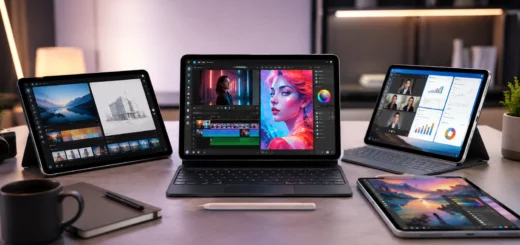
iPad Pro multitasking with video editing, graphic design, and document management applications on a professional workspace
Users can:
- Edit 4K and even 8K videos
- Create complex graphic designs
- Run professional photo editing software
- Manage large spreadsheets
- Work with multiple applications simultaneously
The high-performance architecture ensures smooth operation, even when switching between demanding tasks. This level of power allows users to replace or supplement traditional laptops for many everyday workflows.
Stunning Display for Enhanced Productivity
The iPad Pro features one of the most advanced displays available on a tablet. Its high-resolution screen offers exceptional brightness, color accuracy, and detail, making it ideal for both professional and creative work. Benefits of the display include:
- Crisp text for reading and document editing
- Accurate colors for photographers and designers
- Smooth scrolling and responsive touch interactions
- Comfortable viewing during long work sessions
For professionals who spend hours reviewing documents, creating presentations, or editing visual content, the display significantly enhances productivity and user comfort.
Seamless Multitasking Capabilities
Modern productivity depends heavily on multitasking, and the iPad Pro excels in this area. Apple’s iPadOS includes features specifically designed to help users work efficiently across multiple applications. Key multitasking features include:
Split View
Split View allows users to work with two applications side by side. For example, users can take notes while attending a virtual meeting or compare documents without constantly switching screens.
Slide Over
This feature provides quick access to secondary applications without interrupting the primary workflow.
Stage Manager
Stage Manager offers a more desktop-like experience by organizing windows and improving app management. Users can resize windows, switch between projects, and maintain a cleaner workspace.

iPad Pro displaying Split View and Stage Manager with multiple apps open for efficient multitasking and workflow management.
These multitasking tools help users maximize efficiency and stay focused on their tasks.
Apple Pencil: A Game-Changer for Productivity
The Apple Pencil transforms the iPad Pro into a versatile note-taking and creative tool. For students, educators, designers, and business professionals, it provides a natural writing and drawing experience.

Professional using Apple Pencil on iPad Pro to take handwritten notes and annotate digital documents.
Popular uses include:
- Taking handwritten notes
- Annotating PDFs
- Sketching concepts and designs
- Marking up presentations
- Signing documents digitally
The precision and responsiveness of the Apple Pencil make it feel remarkably similar to writing on paper, helping users stay organized and productive.
Magic Keyboard Turns the iPad Pro into a Laptop Alternative
While the touchscreen experience is excellent, many productivity tasks benefit from a physical keyboard. The Magic Keyboard enhances the iPad Pro by providing:

iPad Pro connected to Magic Keyboard being used for writing reports, emails, and professional business tasks.
- Comfortable typing experience
- Integrated trackpad
- Adjustable viewing angles
- Backlit keys for low-light environments
With the Magic Keyboard attached, the iPad Pro functions similarly to a traditional laptop while maintaining the flexibility of a tablet. This hybrid functionality appeals to professionals who frequently work on the go.
Powerful App Ecosystem
A productivity device is only as good as the software it supports. The iPad Pro benefits from Apple’s extensive app ecosystem, offering thousands of professional-grade applications. Popular productivity categories include:
Office and Business Apps
Applications for document creation, spreadsheets, presentations, and project management help professionals stay productive from virtually anywhere.
Creative Applications
Graphic designers, photographers, and video editors can access powerful tools for content creation and editing.
Collaboration Platforms
Video conferencing, team communication, and cloud collaboration apps allow remote teams to work effectively.
Note-Taking and Organization Apps
Advanced note-taking tools help users manage ideas, schedules, and projects efficiently. The availability of professional software makes the iPad Pro suitable for both business and creative environments.
Excellent Portability for Mobile Professionals
One of the biggest advantages of the iPad Pro is its portability. Compared to many traditional laptops, it is lighter, thinner, and easier to carry. Benefits for mobile professionals include:
- Easy transportation during travel
- Quick setup in meetings
- Comfortable use in confined spaces
- Long battery life for all-day productivity
Whether working from a coffee shop, airport, client site, or home office, users can remain productive without carrying bulky equipment.
Seamless Integration with the Apple Ecosystem
The iPad Pro becomes even more powerful when used alongside other Apple devices. Features such as ecosystem integration create a smooth workflow across multiple devices.

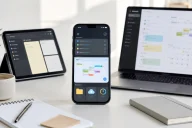
iPad Pro, iPhone, and MacBook working together with file synchronization, cross-device productivity, and seamless workflow integration.
Key advantages include:
Universal Clipboard
Copy content on one Apple device and paste it on another.
Handoff
Start a task on one device and continue it seamlessly on another.
AirDrop
Transfer files quickly without cables or complicated setup procedures.
iCloud Synchronization
Keep documents, photos, notes, and files updated across devices automatically. This level of integration saves time and reduces workflow interruptions.
Ideal for Remote Work and Hybrid Work Environments
Remote work has become a permanent part of many industries, and the iPad Pro is well-equipped for modern work environments.

Business professional attending a virtual meeting on iPad Pro while collaborating on documents and project files.
Features supporting remote productivity include:
- High-quality front-facing cameras
- Excellent microphones
- Reliable video conferencing capabilities
- Cloud-based collaboration tools
- Portable design for flexible workspaces
Employees can attend meetings, share presentations, edit documents, and communicate with colleagues from virtually any location.
Creative Professionals Benefit Greatly
Creative professionals often require devices that combine performance with flexibility. The iPad Pro excels in creative industries because it supports:

Designer creating digital artwork on iPad Pro using Apple Pencil and professional creative applications.
- Digital illustration
- Graphic design
- Video production
- Photography workflows
- Music production
The combination of powerful hardware and touch-based interaction creates a unique experience that many creatives prefer over traditional desktop setups for certain tasks.
Security and Privacy Features
Productivity is not just about performance-it also involves protecting valuable information. The iPad Pro includes several security features that help users safeguard personal and professional data. These include:
- Biometric authentication
- Secure device encryption
- Privacy-focused software controls
- Regular operating system updates
Businesses and professionals can work with confidence knowing that their information is protected by industry-leading security measures.
Future-Proof Technology
Technology investments should remain useful for years, and the iPad Pro is designed with longevity in mind. Apple provides long-term software support and regular updates that introduce new features and security improvements. This future-proof approach ensures users can continue benefiting from their device long after purchase, making it a worthwhile investment for productivity-focused individuals.
Conclusion
The iPad Pro has redefined what a tablet can achieve. Combining exceptional performance, advanced multitasking features, a stunning display, Apple Pencil support, keyboard compatibility, and a rich software ecosystem, it serves as a powerful productivity tool for professionals, students, entrepreneurs, and creatives alike. Its portability, seamless integration with the Apple ecosystem, and ability to handle demanding workloads make it one of the most versatile devices available today. Whether you’re managing business operations, creating digital content, attending remote meetings, or organizing daily tasks, the iPad Pro provides the tools needed to work efficiently from anywhere. For anyone seeking a device that balances power, flexibility, and mobility, the iPad Pro truly stands as the ultimate productivity tool.