Desktop Form Factors Explained: Understanding Different Types of Desktop Computers
Desktop computers remain an important part of modern computing, offering performance, flexibility, and upgrade options for different types of users. Although laptops and tablets have become increasingly popular, desktop PCs continue to serve homes, offices, educational institutions, gaming environments, and professional workplaces. One reason for their continued relevance is the variety of desktop form factors available today.
Table of Contents
Desktop form factors describe the physical design, size, and internal arrangement of a computer. They determine how much space a system occupies, what components it can accommodate, how easily it can be upgraded, and how effectively it handles cooling. From traditional tower computers to compact mini PCs and all-in-one systems, each form factor offers a different combination of advantages.
Understanding desktop form factors makes it easier to choose a computer that matches your workspace, performance requirements, and budget. Whether you need a powerful workstation, a space-saving office computer, or a flexible gaming setup, knowing the differences can help you make a better decision.
What are Desktop Form Factors?
A desktop form factor refers to the physical configuration and dimensions of a desktop computer. It influences the size of the case, motherboard compatibility, cooling arrangements, expansion capabilities, and the types of hardware that can be installed.
Desktop computers are available in several configurations. Some are designed to accommodate full-sized graphics cards, multiple storage drives, and advanced cooling systems. Others prioritize portability and space efficiency by using smaller components and integrated hardware.
The most common desktop form factors include full tower, mid tower, mini tower, small form factor, mini PC, and all-in-one computers. Although these systems perform similar basic computing functions, their designs make them suitable for different situations.
Full Tower Desktop PCs
Full tower desktops are among the largest traditional desktop computer designs. They provide extensive internal space for high-performance components, making them popular among enthusiasts, professional users, and gamers who require powerful hardware.

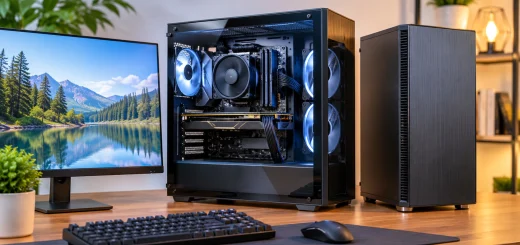
Full tower desktop computer showing a spacious interior with a large graphics card, motherboard, multiple cooling fans, and expandable hardware components.
A full tower case can accommodate large motherboards, multiple graphics cards depending on compatibility, several storage drives, and advanced cooling solutions. The additional space also makes cable management easier and provides room for upgrades.
One of the biggest advantages of full tower desktops is their flexibility. Users can install high-end processors, large graphics cards, liquid cooling systems, and additional expansion cards without facing the space limitations commonly found in smaller cases.
However, these computers require considerable desk or floor space. Their larger size and component requirements can also increase the overall cost. Full tower systems are generally unnecessary for basic office work, web browsing, or everyday productivity.
They are best suited for demanding gaming setups, professional workstations, video editing, 3D rendering, and users who want extensive customization options.
Mid Tower Desktop PCs
Mid tower desktops are among the most popular desktop form factors because they offer a practical balance between size, performance, and upgrade flexibility.
They are smaller than full tower systems but generally provide enough internal room for standard motherboards, dedicated graphics cards, multiple storage drives, and suitable cooling components.

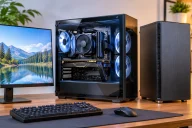
Mid tower desktop computer with a dedicated graphics card, cooling fans, and modern internal components positioned beside a monitor.
For many users, mid tower computers provide everything needed without occupying excessive space. They can support gaming hardware, productivity components, and professional applications while remaining relatively easy to assemble and maintain.
Another advantage is component availability. Most mainstream desktop hardware is designed with standard-sized cases in mind, making it easier to find compatible motherboards, power supplies, graphics cards, and cooling solutions.
Mid tower desktops are suitable for home users, office environments, gamers, content creators, and people building their first custom desktop computer.
Their main limitation is that they still require a dedicated space. They may also be larger than necessary for users who only need a computer for basic everyday activities.
Mini Tower Desktop PCs
Mini tower desktops offer a smaller alternative to traditional mid tower systems. Their compact dimensions make them suitable for environments where desk space is limited but users still want a conventional desktop computer.

Compact mini tower desktop computer positioned beside a monitor in a home office workspace.
These systems are commonly used in offices, schools, homes, and small businesses. They can handle everyday activities such as document editing, internet browsing, video conferencing, presentations, and business applications.
Depending on the design, mini tower computers can support standard desktop processors, memory upgrades, storage expansion, and entry-level dedicated graphics cards. However, their internal space is more restricted than that of larger tower systems.
Cooling and power supply compatibility can also become important considerations. Some compact cases support only specific component sizes, limiting the range of hardware upgrades available.
Mini tower desktops are a good choice for users who need more flexibility than an all-in-one computer but do not require the extensive expansion capabilities of a larger tower.
Small Form Factor Desktop PCs
Small form factor (SFF) desktops are designed to deliver desktop computing capabilities within a significantly smaller enclosure. They are particularly useful for offices, reception areas, educational environments, and home workspaces.

Small form factor desktop computer positioned beside a monitor in a compact and organized office workspace.
Unlike traditional tower computers, SFF systems prioritize efficient component placement. Manufacturers often use compact motherboards, smaller power supplies, and carefully arranged cooling systems to reduce the overall footprint.
Despite their smaller dimensions, many modern SFF desktops offer capable processors, solid-state storage, and sufficient memory for demanding everyday productivity tasks. Some models also support dedicated graphics, although compatibility depends on the available internal space and power capacity.
Their compact design makes them easier to position behind monitors, under desks, or in small workstation setups. Businesses often prefer SFF computers because they help create cleaner and more organized work environments.
The main disadvantage is limited upgrade flexibility. Large graphics cards, conventional power supplies, and extensive cooling systems may not fit inside these enclosures. Users should also consider thermal performance when choosing an SFF system for continuous heavy workloads.
Mini PCs
Mini PCs take desktop compactness a step further. These extremely small computers are designed to deliver essential computing capabilities in an enclosure that can sometimes fit in the palm of a hand.
Many mini PCs use energy-efficient processors, integrated graphics, compact memory configurations, and SSD storage. They can connect to external monitors, keyboards, mice, and other peripherals, providing a traditional desktop experience without a large computer case.

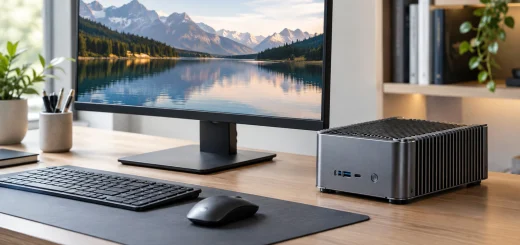
Ultra-compact mini PC connected to a monitor and positioned beside a wireless keyboard and mouse on a modern desk.
Mini PCs are particularly useful for web browsing, office productivity, media streaming, digital signage, remote work, and home entertainment systems. Some higher-performance models can also handle programming, light creative workloads, and selected gaming applications.
Their small size makes them easy to carry, install, and position in almost any workspace. They also generally consume less power than larger desktop systems.
However, mini PCs usually have fewer upgrade options. Some models have soldered memory, limited storage expansion, and integrated graphics. Their compact cooling arrangements can also restrict sustained performance during demanding workloads.
For users who prioritize space efficiency and everyday computing rather than maximum performance, mini PCs offer an attractive solution.
All-in-One Desktop Computers
All-in-one (AIO) desktop computers combine the main computer hardware and display into a single unit. Instead of placing a separate tower beneath or beside a monitor, most of the essential components are integrated behind the screen.

Modern all-in-one desktop computer featuring a slim integrated display, wireless keyboard, and mouse in a minimalist workspace.
This design reduces cable clutter and creates a clean, modern appearance. All-in-one systems are commonly used in homes, offices, reception areas, classrooms, and creative workspaces.
One of their biggest advantages is convenience. Users generally need to connect only a power cable and basic peripherals to get started. Many models also include built-in speakers, webcams, microphones, and wireless connectivity.
Modern all-in-one computers are available with different processor configurations, display resolutions, and memory capacities. Premium models may include high-resolution touchscreens and displays suitable for creative work.
However, AIO systems often provide fewer hardware upgrade options than traditional desktops. Memory and storage accessibility vary by model, while processor and graphics upgrades are generally difficult or impossible. If the integrated display develops a problem, repairing the system can also be more complicated.
All-in-one desktops are ideal for users who value appearance, convenience, and reduced cable management over extensive hardware customization.
Desktop Form Factors Compared
Different desktop designs offer different benefits depending on the intended use.
Full tower systems prioritize maximum internal space and expansion. Mid tower desktops provide a balance between performance and practicality. Mini towers reduce the physical footprint while retaining some upgrade flexibility.
SFF computers and mini PCs focus on space efficiency, making them useful for compact workspaces. All-in-one desktops combine the display and computing hardware to create a convenient, integrated setup.
Choosing between these options involves considering more than just external dimensions. Users should also evaluate motherboard compatibility, processor performance, graphics requirements, cooling capacity, power supply specifications, and future upgrade needs.
How to Choose the Right Desktop Form Factor
The best desktop form factor depends on how you plan to use your computer.
For gaming and demanding professional applications, a mid tower or full tower desktop is often a practical choice. These systems offer greater compatibility with powerful graphics cards, advanced cooling solutions, and additional storage.
For general office productivity, a mini tower or small form factor desktop can provide sufficient performance without occupying too much space. Businesses that need multiple computers may particularly benefit from compact systems.
Mini PCs are suitable for basic computing, media consumption, home entertainment, and lightweight productivity. They are also useful when installing a computer behind a monitor or inside a restricted workspace.
All-in-one desktops are worth considering when appearance, simplicity, and minimal cable clutter are important. They provide an integrated workstation without requiring a separate computer tower.
Before purchasing, check the available upgrade options. A computer that meets your current requirements may become limiting if you later need additional memory, storage, or graphics performance.
Cooling is another important consideration. Smaller computers often have less room for airflow, which can affect performance during extended workloads. Choosing a system with appropriate thermal management helps maintain reliable operation.
The Future of Desktop Form Factors
Desktop computer designs continue to evolve as processors become more energy-efficient and hardware components become increasingly compact. Mini PCs and SFF systems are gaining attention because they provide useful performance without requiring large enclosures.
At the same time, traditional tower desktops remain relevant for users who need powerful graphics, extensive storage, advanced cooling, and long-term upgrade flexibility.
Manufacturers are also developing more efficient all-in-one systems with improved displays, integrated connectivity, and better performance. These developments are making desktop computing more adaptable to different work environments.
The future of desktop form factors is likely to focus on balancing performance, energy efficiency, thermal management, and physical size rather than relying on a single universal design.
Conclusion
Desktop form factors play an important role in determining how a computer fits into your workspace and meets your computing requirements. From full tower systems designed for maximum performance to compact mini PCs built for everyday convenience, each configuration serves a different purpose.
Understanding these differences helps you choose a desktop that offers the right combination of performance, size, cooling, and upgrade flexibility. Whether you are purchasing a computer for gaming, professional work, office productivity, or home entertainment, selecting the appropriate form factor can improve your overall computing experience.
A well-chosen desktop should not only meet your current needs but also provide enough flexibility and reliability for the years ahead.