Business Desktop Types Explained
Choosing the right desktop computer for a business is not simply about picking a machine with the fastest processor or the most storage. Different businesses have different workloads, workspace requirements, budgets, and performance needs. A computer used for accounting may have very different requirements from one used for graphic design, engineering, software development, or customer service.
Table of Contents
Understanding the different business desktop types makes it easier to choose a system that delivers the right balance of performance, reliability, flexibility, and cost. From traditional tower desktops to compact mini PCs and all-in-one systems, each type has advantages that make it suitable for particular professional environments.
What are Business Desktops?
Business desktops are computers designed primarily for professional and workplace use. They are generally built to handle everyday productivity applications such as office software, web-based tools, accounting programs, video conferencing, databases, and business management systems.
Compared with consumer-focused desktops, business systems often place greater emphasis on reliability, security, manageability, upgradeability, and long-term use. Many organizations also prefer standardized desktop configurations because they simplify maintenance and support.
The best business desktop depends on what employees actually need to accomplish during their working day.
1. Tower Business Desktops
Tower desktops are one of the most versatile business desktop types. They feature a separate computer case that typically sits under or beside a desk and connects to an external monitor, keyboard, and mouse.
Their biggest advantage is flexibility. Tower desktops usually provide more internal space for components than compact systems. Depending on the model, users may be able to upgrade RAM, storage, graphics cards, cooling systems, and other components.

Tower business desktop computer in a professional office.
This makes tower desktops particularly useful for demanding professional workloads. Architects, engineers, video editors, developers, analysts, and other professionals can benefit from their higher performance and expansion possibilities.
They are also a good choice for businesses that expect their computing requirements to increase over time. Instead of replacing the entire computer, a company may be able to upgrade individual components.
The main disadvantage is their larger footprint. They require more desk or floor space and generally consume more power than smaller desktop designs.
2. Small Form Factor Desktops
Small form factor, or SFF, desktops are designed to provide desktop performance while taking up considerably less space than traditional towers.
These systems are popular in offices where desk space is limited. They can often be positioned horizontally or vertically and may fit easily underneath monitors or in dedicated computer areas.

Small form factor desktop computer in an office workspace.
SFF desktops are suitable for common business workloads such as word processing, spreadsheets, email, web applications, accounting software, customer relationship management, and video conferencing.
Although they are smaller, many SFF computers still provide multiple ports and reasonable upgrade options. However, their compact internal design can limit the size or number of components that can be installed.
For businesses that need capable computers without large cases, SFF desktops offer a practical middle ground between traditional towers and mini PCs.
3. Mini PCs
Mini PCs are among the smallest business desktop types available. Their compact size makes them particularly attractive for modern offices, reception desks, retail counters, classrooms, and workspaces where every inch matters.
A mini PC can often be mounted behind a monitor or attached underneath a desk, creating a clean and uncluttered workspace. Despite their small size, many current mini PCs can handle everyday office applications, multitasking, web-based business platforms, and video conferencing comfortably.

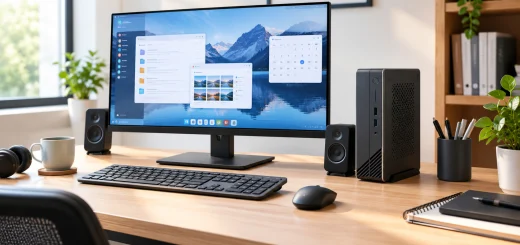
Compact mini PC used in a modern business office.
They can also be useful for digital signage, kiosks, point-of-sale systems, and specialized business applications.
The primary limitation is upgradeability. Some mini PCs have limited options for replacing or adding internal components. Thermal constraints may also prevent them from delivering the sustained performance of larger desktops.
For employees who primarily use cloud applications, office software, browsers, and communication tools, a mini PC can provide an efficient combination of performance and space savings.
4. All-in-One Business Desktops
All-in-one, or AIO, desktops combine the computer hardware and display into a single unit. Instead of having a separate desktop case and monitor, most of the components are integrated behind the screen.
This design creates a clean and professional workspace with fewer cables. AIO desktops can be especially useful in reception areas, customer service departments, clinics, retail environments, and offices where appearance and organization are important.

All-in-one desktop computer on a modern office desk.
Another advantage is simple installation. Employees can generally connect the keyboard and mouse, plug in the system, and begin working without managing multiple separate components.
However, AIO systems are typically less upgradeable than tower desktops. If the display or major internal hardware develops a problem, replacing individual components can be more difficult. Businesses should therefore consider long-term serviceability before choosing this design.
5. Workstation Desktops
Workstations are specialized business desktops designed for demanding professional applications. They typically offer powerful processors, large amounts of memory, professional graphics capabilities, and fast storage.
Workstations are suitable for tasks such as 3D modeling, computer-aided design, scientific computing, engineering simulations, professional video production, data analysis, and advanced software development.

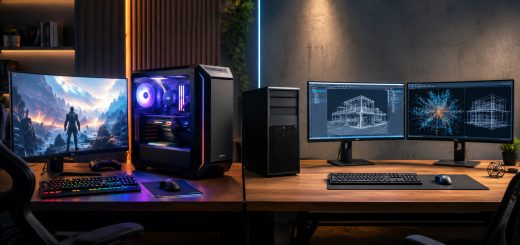
High-performance business workstation for professional workloads.
Their components are often selected to provide sustained performance under heavy workloads rather than simply delivering strong results in short bursts.
The downside is cost. Workstations can be significantly more expensive than standard office desktops. They may also consume more electricity and require additional cooling.
For employees performing highly demanding tasks, however, the additional investment can improve productivity and reduce waiting times.
6. Gaming-Style PCs for Business Workloads
Some businesses use high-performance consumer or gaming-oriented desktops for professional tasks that require powerful hardware. These systems may include high-end processors, dedicated graphics cards, fast SSDs, and large amounts of RAM.
They can be useful for creative agencies, media companies, developers, 3D artists, and other professionals who need substantial graphics or processing performance.
However, businesses should consider more than raw specifications. A professional environment may prioritize warranty support, security features, manageability, reliability, and understated designs over gaming-focused features.
For specialized workloads, a business workstation may be a better long-term choice even if a gaming PC offers similar performance.
7. Business Desktop Thin Clients
Thin clients are a different approach to desktop computing. Instead of performing most processing locally, they rely heavily on centralized servers or cloud-based virtual desktop environments.
They are commonly used in organizations where employees access centrally managed applications and data. Since much of the computing environment is controlled remotely, IT teams can simplify software deployment, security management, and maintenance.

Thin client desktops in a centralized business computing environment.
Thin clients can be useful in call centers, educational institutions, healthcare environments, and businesses with standardized workloads.
Their major limitation is dependence on a reliable network and centralized infrastructure. They are also less suitable for users who need powerful local processing.
How to Choose the Right Business Desktop
Choosing between different business desktop types starts with identifying the employee’s workload.
For basic office tasks, a mini PC, SFF desktop, or standard business desktop may be sufficient. Employees working with large spreadsheets, databases, programming environments, or demanding multitasking may benefit from a more powerful tower system.
Creative professionals and engineers should consider workstations with higher-performance processors, dedicated graphics, and additional memory. Meanwhile, businesses with limited physical space may prioritize mini PCs or AIO systems.
Upgradeability is another important consideration. A desktop that can accommodate additional RAM or storage may remain useful for longer as business requirements change.
Security should also be part of the decision. Businesses should consider features such as hardware-based security, secure boot capabilities, device management, and support for organizational security policies.
Finally, businesses should evaluate total cost rather than purchase price alone. Warranty coverage, energy consumption, maintenance, upgrade costs, and expected lifespan can significantly affect the long-term value of a desktop fleet.
Here’s a quick comparison table you can place after the introduction or just before the conclusion:
Quick Comparison of Business Desktop Types
| Desktop Type | Performance | Space Required | Upgradeability | Best For |
|---|---|---|---|---|
| Tower Desktop | High | High | Excellent | Power users, engineering, development |
| Small Form Factor (SFF) | Medium–High | Medium | Good | General office work, multitasking |
| Mini PC | Medium | Very Low | Limited | Compact offices, everyday productivity |
| All-in-One (AIO) | Medium | Low | Limited | Reception, retail, customer service |
| Workstation | Very High | High | Excellent | CAD, 3D design, video editing |
| Gaming-Style PC | High–Very High | Medium–High | Excellent | Creative and graphics-intensive work |
| Thin Client | Low–Medium | Very Low | Limited | Cloud and centrally managed environments |
This table gives readers a quick way to compare business desktop types based on performance, space, upgradeability, and typical use cases.
Conclusion
The wide range of business desktop types gives organizations plenty of options for building an efficient workplace. Tower desktops provide excellent flexibility and expansion potential, while SFF systems save space without sacrificing too much capability. Mini PCs are ideal for compact workspaces, AIO desktops offer a clean all-in-one design, and workstations deliver the performance required for demanding professional applications.
There is no single business desktop that is perfect for every employee. The right choice depends on workload, workspace, budget, upgrade requirements, security expectations, and long-term business needs. By matching desktop hardware to actual job requirements, businesses can avoid unnecessary spending while giving employees the performance and reliability they need to work efficiently.