Server Operating Systems: Features and Considerations
A server operating system (server OS) is the foundation that enables servers to manage applications, databases, networks, users, storage, and other essential resources. Unlike desktop operating systems designed primarily for individual users, server operating systems are built to handle multiple users, demanding workloads, continuous operation, and network-based services.
Choosing the right server operating system is an important decision for businesses of every size. The right platform can improve performance, security, reliability, scalability, and administrative efficiency, while a poorly suited operating system can create unnecessary costs and management challenges.
Table of Contents
What is a Server Operating System?
A server operating system is specialized system software designed to run on physical or virtual servers and provide services to other computers, applications, and users across a network. A server OS manages hardware resources such as processors, memory, storage devices, and network interfaces while also providing a platform for hosting applications and services. Depending on the organization, a server may be used for web hosting, file sharing, email, databases, virtualization, cloud applications, authentication, or enterprise software.

Server rack connecting desktop computers, laptops, mobile devices, and other network devices.
Popular server operating systems include Microsoft Windows Server and various Linux distributions such as Ubuntu Server, Red Hat Enterprise Linux, Debian, and SUSE Linux Enterprise Server.
Key Features of Server Operating Systems
Server operating systems include several features that distinguish them from consumer-oriented operating systems.
1 Multi-User Support
Servers often need to provide services to many users simultaneously. A server OS manages multiple user accounts, permissions, sessions, and applications while ensuring that resources are allocated appropriately. This makes multi-user support essential for organizations where employees need access to shared files, applications, databases, or network resources.

Server showing CPU, memory, storage, networking, user access, and system monitoring features.
2 Network Management
Networking is one of the most important functions of a server operating system. Servers communicate with client computers and other servers through wired or wireless networks. Server operating systems support features such as network configuration, remote access, DNS services, DHCP, file sharing, directory services, and network security. These capabilities allow organizations to build and manage reliable IT infrastructures.
3 Security and Access Control
Security is a major consideration when deploying servers because they often store sensitive information and run critical applications.

Secure enterprise server protected by cybersecurity shields, authentication, encryption, and access controls.
Server operating systems provide authentication mechanisms, user permissions, firewalls, encryption capabilities, security policies, auditing, and other access-control features. Administrators can determine who can access specific files, applications, services, and system resources. Regular security updates are also essential for protecting servers against newly discovered vulnerabilities.
4 Reliability and Stability
Servers are frequently expected to operate continuously. Businesses may depend on them for websites, databases, internal applications, communication systems, and other essential services. Server operating systems are therefore designed with stability and reliability in mind. Features such as system monitoring, service management, fault detection, backup integration, and recovery tools can help minimize downtime.
5 Resource Management
A server may need to handle hundreds or thousands of simultaneous requests. The operating system manages CPU usage, memory allocation, storage operations, and network traffic to keep workloads running efficiently. Advanced resource management can also help administrators prioritize important applications and prevent a single workload from consuming excessive system resources.
6 Remote Administration
Server administrators often need to manage systems without physically accessing the server. Remote administration tools allow them to configure settings, install software, monitor performance, troubleshoot problems, and perform maintenance from another computer. This capability is particularly valuable in data centers and distributed environments where servers may be located in different buildings, cities, or countries.
Common Types of Server Operating Systems
Different server operating systems are designed for different environments and workloads.
Windows Server
Microsoft Windows Server is widely used in business environments, particularly organizations that rely on Microsoft technologies. It provides integration with services such as Active Directory, Microsoft SQL Server, Microsoft 365, and various enterprise applications. Windows Server also offers graphical administration tools, making it familiar to organizations that already use Windows-based systems.

Enterprise and open-source Linux server operating system environments in a modern data center.
Linux Server Distributions
Linux is one of the most widely used choices for servers. Unlike a single commercial operating system, Linux is available through numerous distributions. Ubuntu Server is popular for web servers, cloud environments, development, and general-purpose workloads. Red Hat Enterprise Linux is widely used in enterprise environments where commercial support and long-term stability are important. Debian and SUSE Linux Enterprise Server are other established options. Linux is also highly customizable and supports a wide range of open-source server software.
Unix and Unix-Like Systems
Traditional Unix systems have played an important role in the development of modern server computing. Although their market presence has changed over time, Unix-based platforms continue to be used in certain enterprise, scientific, and specialized environments.
Server OS vs. Desktop OS
Although server and desktop operating systems share many fundamental concepts, they are designed for different purposes. Desktop operating systems prioritize user interaction, multimedia, productivity applications, and ease of everyday use. Server operating systems focus more heavily on network services, security, reliability, remote administration, resource management, and continuous operation. A desktop computer may be used primarily by one person, while a server can provide services to many users and devices simultaneously.
Factors to Consider When Choosing a Server Operating System
Selecting a server OS should be based on the organization’s technical requirements, budget, existing infrastructure, and future plans.
Workload Requirements
Start by identifying what the server will actually do. A basic file server has different requirements from a database server, web server, virtualization host, or application server. Understanding the workload helps determine the necessary processor, memory, storage, networking, and operating system capabilities.
Hardware Compatibility
The operating system should be compatible with the server’s hardware and required peripherals. Check processor architecture, storage controllers, network adapters, virtualization support, and available drivers before deployment. Hardware compatibility is particularly important when using specialized or recently released server components.
Security
Evaluate the operating system’s security features, update policies, authentication mechanisms, access controls, and available security tools. Organizations should also consider how quickly security patches are released and how easily administrators can deploy them across multiple servers.
Performance and Scalability
A server operating system should be able to handle current workloads while providing room for future growth. Consider how easily the platform can support additional processors, memory, storage, users, virtual machines, or applications. Scalability can reduce the need for frequent platform migrations as the organization expands.
Management and Administration
The complexity of server management can significantly affect IT costs. Consider the available administration tools, automation capabilities, monitoring systems, remote-management options, and documentation. Organizations should also consider the technical skills of their existing IT team. A familiar platform may reduce training and troubleshooting requirements.
Cost and Licensing
The total cost of ownership includes more than the initial operating system price. Licensing, commercial support, hardware requirements, maintenance, security tools, training, and administration should all be considered. Linux distributions may offer flexible open-source options, while commercial platforms can provide enterprise support and specialized management features.
Software Compatibility
The server OS must support the applications and services the organization intends to run. Before choosing a platform, verify compatibility with databases, web applications, virtualization software, backup systems, monitoring tools, and other critical applications.
Virtualization and Cloud Computing
Modern server environments increasingly rely on virtualization and cloud computing. A single physical server can host multiple virtual machines, each running its own operating system and applications.
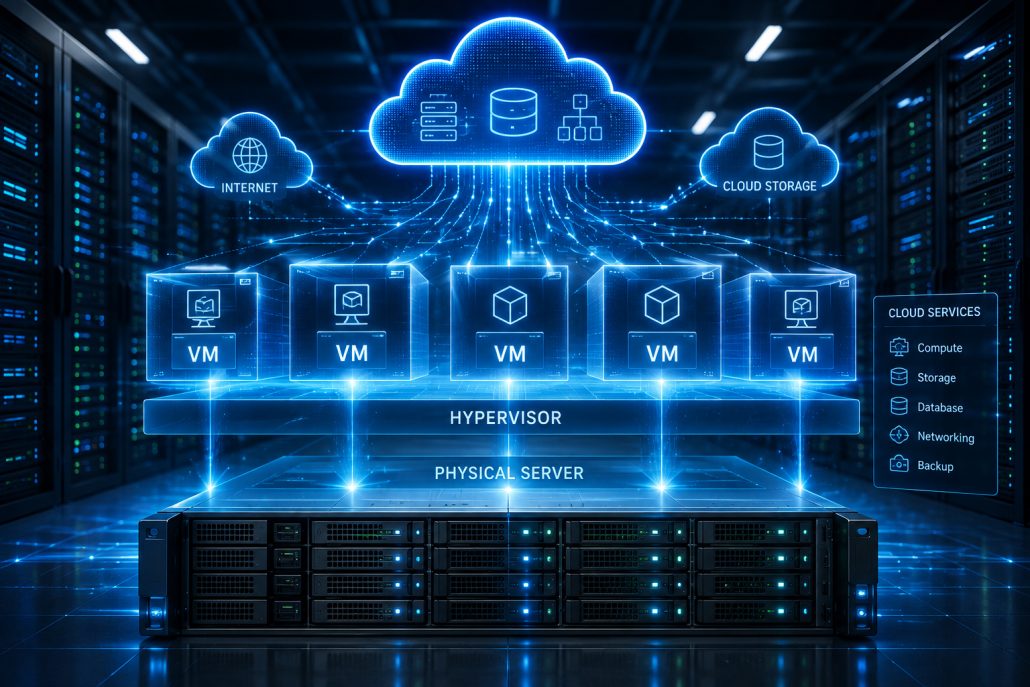
Physical servers running virtual machines connected to cloud computing infrastructure.
Server operating systems may also operate within cloud environments provided by major cloud platforms. This gives organizations greater flexibility to scale computing resources according to demand. When choosing a server OS, it is therefore useful to consider its compatibility with virtualization platforms, containers, cloud services, and automation tools.
Backup and Disaster Recovery
No server environment is completely protected from hardware failures, software problems, cyberattacks, or human errors. A reliable backup and disaster recovery strategy is therefore essential.

Server infrastructure with backup storage and disaster recovery systems.
The chosen server OS should work effectively with the organization’s backup solutions and recovery procedures. Administrators should regularly test backups rather than assuming that a backup system will work when an emergency occurs.
Conclusion
A server operating system provides the foundation for managing servers, applications, users, networks, and critical business resources. Its features directly influence security, performance, reliability, scalability, and administrative efficiency. Windows Server and Linux distributions remain popular choices, but there is no single best server operating system for every organization. The right choice depends on workload requirements, hardware compatibility, security needs, budget, software compatibility, technical expertise, and future growth. As businesses increasingly adopt virtualization, cloud computing, containers, and distributed applications, choosing a flexible and well-supported server operating system has become more important than ever. By evaluating both current requirements and long-term objectives, organizations can select a server platform that provides a stable foundation for their IT infrastructure.